Invoicing · CRM · AI · Social Media · GST · Payroll — All-in-One

The Smartest Way to
Run Your Business

Acois automates your invoicing, leads, social media posts, payroll, and client communication — all from one beautiful platform built for modern businesses.

Invoicing Multi-Currency GST Reports AI Email Writer Social Media Automation CRM Kanban Payroll Attendance Email Campaigns Meetings Support Tickets 27-Section Docs
app.acois.io/home
Revenue
₹4,82,300
↑ 18.4%
Active Leads
63
12 new today
Pending Invoices
18
₹1,28,000 due
Scheduled Posts
8
Next: 2:00 PM
Revenue History
Social Queue
L
LinkedIn Post
2:00 PM
I
Instagram Reel
4:00 PM
F
FB Update
6:00 PM
T
Twitter
8:00 PM
Recent Activity
✅ Invoice #248 paid by Nexus Tech
📧 AI email sent to GlobalMart lead
📱 Post scheduled on Instagram
🎯 Lead converted: Alpha Corp → Client
26+
Modules
15+
Reports
10
Templates
6
Social Platforms
GST
India Ready
Powered by GPT-4o-mini

Acois AI — Automate Everything

Acois AI is embedded into every workflow — not a chatbot widget, but a real business assistant that reads your data and takes action.

AI Social Media Post Creator
Write → Schedule → Publish in 3 clicks

Describe your product or promotion, pick your platforms — AI writes the caption, adds relevant hashtags, and queues the post for scheduled publishing across Facebook, Instagram, LinkedIn, Twitter, YouTube, and Pinterest.

You type:
"New year discount offer 30% off on all plans"
AI writes for LinkedIn:
"🎉 Start the new year right! We're offering 30% off all Acois plans this January. Manage your invoicing, CRM & payroll smarter in 2025. 👉 Sign up today! #BusinessTools #SaaS #NewYear"
AI Email Writer for Clients
Invoice emails · Quote follow-ups · Campaigns

One click on any invoice or quote generates a professional, personalised email body. For bulk campaigns, AI writes the subject line and body with client placeholders ({{name}}, {{company}}) automatically inserted.

Invoice #248 — AI drafted:
"Dear {{name}}, Please find attached Invoice #INV-248 for ₹46,610. Payment is due by 15th Jan 2025. For any queries, feel free to reach us..."
Acois Chat — Live Business Q&A
Floating assistant with live DB context

Ask anything about your business — "Who owes me the most?", "How many leads did I win this month?", "What's my top expense category?" — and Acois Chat pulls live data from your database to answer instantly.

Who owes me the most?
A
GlobalMart has ₹82,000 outstanding across 3 invoices, oldest dated Nov 2024.
Image to Invoice + AI Reports
Photo scan + natural language analytics

Upload a photo of a handwritten bill or printed invoice — AI extracts all line items and creates a draft invoice for you. Plus, ask AI report questions like "What was my best month this year?" and get instant chart-ready answers.

Social Media Automation

Post to 6 Platforms — From One Place

Manage your entire social media presence inside Acois. Create content, let AI write the caption, schedule it, and track publishing — no third-party tools needed.

Supported Platforms
Facebook
Pages, Groups, Stories
Instagram
Feed, Reels, Stories
LinkedIn
Profile & Company Pages
Twitter / X
Tweets & Threads
YouTube
Community & Videos
Pinterest
Boards & Pins
How Social Media Automation Works
1
Create Post
Write a short description or let AI generate a platform-specific caption with hashtags from a single prompt.
2
Select Platforms
Tick Facebook, Instagram, LinkedIn, or all 6 — publish simultaneously to every connected account.
3
Schedule or Publish
Choose publish now or schedule for a specific date & time. Posts queue in your content calendar.
4
Track & Review
See published status per platform. Admin documentation included for each platform OAuth setup.
Content Calendar

All scheduled posts appear in a visual calendar view. Drag to reschedule, see status at a glance, and manage your entire content pipeline for the month from one screen.

  • Full month calendar with platform colour coding
  • Reschedule by drag or quick edit
  • Status: Pending / Publishing / Published / Failed
  • Linked to your AI post creator
January 2025 — Scheduled Posts
LinkedIn — New Year Offer
Jan 6 · 10:00 AM
Scheduled
Instagram — Product Feature
Jan 8 · 2:00 PM
Scheduled
Facebook — Client Success Story
Jan 10 · 9:00 AM
Published
Twitter — Quick Tip
Jan 12 · 3:00 PM
Scheduled
CRM & Lead Management

Full-Pipeline CRM — From Lead to Closed Deal

Capture enquiries, nurture with follow-ups and meetings, send targeted email campaigns, and convert won leads into clients and quotes — all in one place.

Kanban Pipeline Board
New
Client A
₹18k
Client B
₹36k
Proposal
Client C
₹54k
Client D
₹72k
Won
Client E
₹90k
Client F
₹108k
  • 6 pipeline stages: New → Contacted → Qualified → Proposal → Won → Lost
  • Drag-to-Lost captures reason via modal — tracks why deals are lost
  • Won column: Convert to Client + Draft Quote in one click
  • Staff only see leads assigned to them
  • Search, filter by source and assigned staff
Enquiry Follow-up Timeline
📞
Call 2 days ago
Spoke with Rahul, interested in Enterprise plan — budget confirmed ₹50k.
📅
Meeting (Auto-logged) Auto-logged from Meeting 3 days ago
Meeting: Product Demo on Jan 5 at 10:00 AM (Video Call)
📧
Email 5 days ago
Sent detailed proposal with pricing breakdown.
🗒️
Note 1 week ago
First contact via website. High interest, follow up in 3 days.
Email Campaigns to Enquiries

Target your lead database with personalised bulk email campaigns. Filter by status, source, assigned staff, or date — then let AI write the email for you.

Filter leads by status (New, Qualified, Proposal…) or source (Website, Referral…)
Preview audience count before sending — know exactly how many will receive it
AI writes Subject + Body with {{name}}, {{email}}, {{company}} placeholders
Track per-lead delivery: sent / failed / pending with error details
Meetings & Calendar Management

Schedule meetings with type selection (In-person, Video Call, Phone, Online), link to an enquiry, add attendees, and view everything on a FullCalendar visual calendar. Completing a meeting auto-logs it to the enquiry timeline.

  • 4 meeting types: In-person, Video Call, Phone, Online
  • Link meetings to an enquiry — auto-updates follow-up dates
  • FullCalendar v6 visual calendar + list view
  • Status: Scheduled → Completed → Rescheduled → Cancelled
  • Completing a meeting auto-logs outcome to enquiry timeline
  • Multi-attendee selection from your staff list
All Modules

Everything Built In — Nothing Extra to Buy

Every module is complete, production-ready, and included in every plan.

Invoicing & Finance

Complete invoicing chain: Quote → Invoice → Payment → Recurring. 10 stunning templates, multi-currency, GST engine, 4 payment gateways.

10 PDF Templates Multi-Currency GST / Tax Engine Stripe · Razorpay · PayPal · Flutterwave Recurring Billing Client Portal Pay Auto Payment Receipt Email Sale Orders · Purchase Orders
Multi-Currency Invoicing
USD $
Nexus Corp
$12,500
EUR €
EuroTech GmbH
€8,200
INR ₹
Alpha Ltd
₹4,82,000

Each client can have their own currency. Invoice amounts, symbols, and format snapshot at creation time. Per-product pricing in multiple currencies supported.

Staff Attendance

Daily attendance sheet, bulk mark present, self-check-in from dashboard, late tracking vs reporting time, date-range history with Excel export.

Rahul S. ✅ Present On time
Priya M. 🕐 Late 32 mins late
Deepak K. ✅ Present On time
Sara J. ❌ Absent
Payroll & Salary

Auto monthly generation via cron. Deductions for absent days, advance salary, PDF payslip, Excel export. Every payment auto-creates an Expense entry.

  • Cron auto-generation every month
  • Advance salary + auto-deduction
  • PDF payslip via DomPDF
  • Excel payroll export
Goals & Targets

Set revenue, client, or custom goals. Live-updating AJAX progress bars, history log with change tracking.

Revenue Q482%
New Clients60%
Reduce Expenses45%
Roles & Permissions

8 built-in roles, 26+ keys across 8 groups. Assign a role → staff permissions update instantly.

S
Sales Executive
A
Accountant
H
HR Manager
C
CRM Executive
Expenses & Bank

Track expenses by category with ITC eligible flag. Manage payment methods (banks), see balances. Salary payments auto-book to expenses.

  • Expense categories (customisable)
  • ITC eligible flag for GST filing
  • Payment method balance tracking
  • Export to Excel
Accounting & Finance

Complete Accounting — End to End

From the first quote to the final payment receipt — every financial document, transaction, and statement is tracked, linked, and reportable inside Acois.

Quote
Sale Order
Invoice
Payment
Expense
Client Statement
Quotes / Estimates
Draft → Send → Accept → Convert to Invoice

Create professional estimates with all 10 templates, send via email, track acceptance status, set validity period and follow-up date. One click converts an accepted quote directly into an invoice — all line items and taxes carried over.

  • 10 PDF templates (same as Invoice — Prestige, Aurora, Linen, Dusk, Neo…)
  • Status: Draft → Sent → Accepted → Rejected
  • Validity period + follow-up date per quote
  • Convert accepted quote to Invoice in one click
  • Send quote via email with AI-drafted cover note
  • Per-client currency — quote in USD, EUR, INR or any currency
Sale Orders (SO)
Order confirmation before invoicing

Raise a sale order to confirm what a client has ordered before dispatching goods or raising an invoice. Track fulfilment status through a full workflow and convert the completed order to an invoice in one click.

  • Status workflow: Draft → Confirmed → Processing → Completed → Cancelled
  • Delivery date tracking per order
  • Place of supply for GST compliance
  • PDF print + email delivery to client
  • Convert completed Sale Order to Invoice instantly
  • Sale Order Report with status-wise analysis
Purchase Orders (PO)
Vendor procurement tracking

Track everything you purchase from vendors. Raise POs with full line items, taxes, and notes — print or email to the vendor. All POs appear in the Purchase Order Report for cost analysis.

  • Full item-level purchase order with tax calculation
  • Vendor management via Clients (type = Vendor)
  • PDF print template + email to vendor
  • Purchase Order Report: vendor-wise cost analysis
  • Supports multi-currency purchasing
  • Place of supply for GST input credit tracking
Expense Management
Track every rupee spent

Log business expenses with vendor name, category, payment method, tax amount, and ITC eligibility flag. Salary payments auto-book here as Salary category. Full export to Excel and visible in the P&L report.

  • Custom expense categories (set in Company Settings)
  • ITC eligible flag — directly feeds GST input credit
  • Tax amount tracking per expense
  • Payment method selection (linked to Bank accounts)
  • Salary payments auto-create Expense entries (category = Salary)
  • Expense Report with category-wise bar chart + Excel export
Account / Client Statement
Full debit-credit ledger per client

Generate a complete account statement for any client — showing opening balance, every invoice (debit), every payment (credit), and a running balance — exactly like a bank statement. Filter by date range, download as PDF, or email directly to the client with a PDF attachment.

  • Opening balance = invoiced before start date minus payments before start date
  • Running balance column — recalculated row by row
  • Supports multi-currency clients (amounts shown in client currency)
  • Print to PDF or download Excel — both available
  • Email statement directly with PDF attachment — one click
  • Client index links directly to their statement
Nexus Technologies
Statement: 01 Jan – 31 Mar 2025
PDF Email
Date Description Debit Credit Balance
Opening Balance ₹12,000
05 Jan Invoice #INV-241 ₹42,000 ₹54,000
12 Jan Payment Received ₹42,000 ₹12,000
18 Feb Invoice #INV-255 ₹28,500 ₹40,500
02 Mar Invoice #INV-261 ₹18,000 ₹58,500
15 Mar Payment Received ₹28,500 ₹30,000
Closing Balance ₹88,500 ₹70,500 ₹30,000
Sales & Payment Tracking

Every invoice raised is tracked through to payment. Multiple payment methods, gateway integration, and automatic receipts sent to the client on payment confirmation.

4 Payment Gateways
Stripe, Razorpay, PayPal, Flutterwave — clients pay online from the invoice link.
Manual Payments
Record cash, cheque, bank transfer payments against any invoice.
Auto Receipt Email
Payment confirmation email sent to client automatically on payment.
Payment Method Report
See which payment method collects the most — bank-wise breakdown.
Reports & Analytics

15 Built-in Business Reports

Every report includes ApexCharts visualisation, date filters, summary KPI cards, and Excel + PDF export. No separate BI tool needed.

Sales Report
Revenue trends by client, date & payment status with chart.
P & L Report
Income vs expenses — net profit at a glance.
GST Report
GSTR-1 style: tax collected, HSN/SAC code breakup.
Tax Report
All taxes applied across invoices in the date range.
Invoice Aging
Receivables buckets: 0–30, 31–60, 61–90, 90+ days.
Client Statement
Full debit/credit ledger per client — PDF + email.
Expense Report
Category-wise spend with ITC eligible filtering.
Payment Collection
Payments grouped by payment method / bank.
Sale Order Report
SO status analysis with delivery tracking.
Purchase Order Report
Vendor-wise purchasing & cost analysis.
Year-on-Year
Monthly revenue comparison across financial years.
Quote Conversion
Accepted vs rejected quotes + top converting clients.
Enquiry Pipeline
Stages, lost reasons & staff conversion performance.
Lead Source Report
Pie chart + conversion rate by acquisition source.
Product Report
Best-sellers, revenue & units sold per product.
Mobile App

Your ERP in
Your Pocket

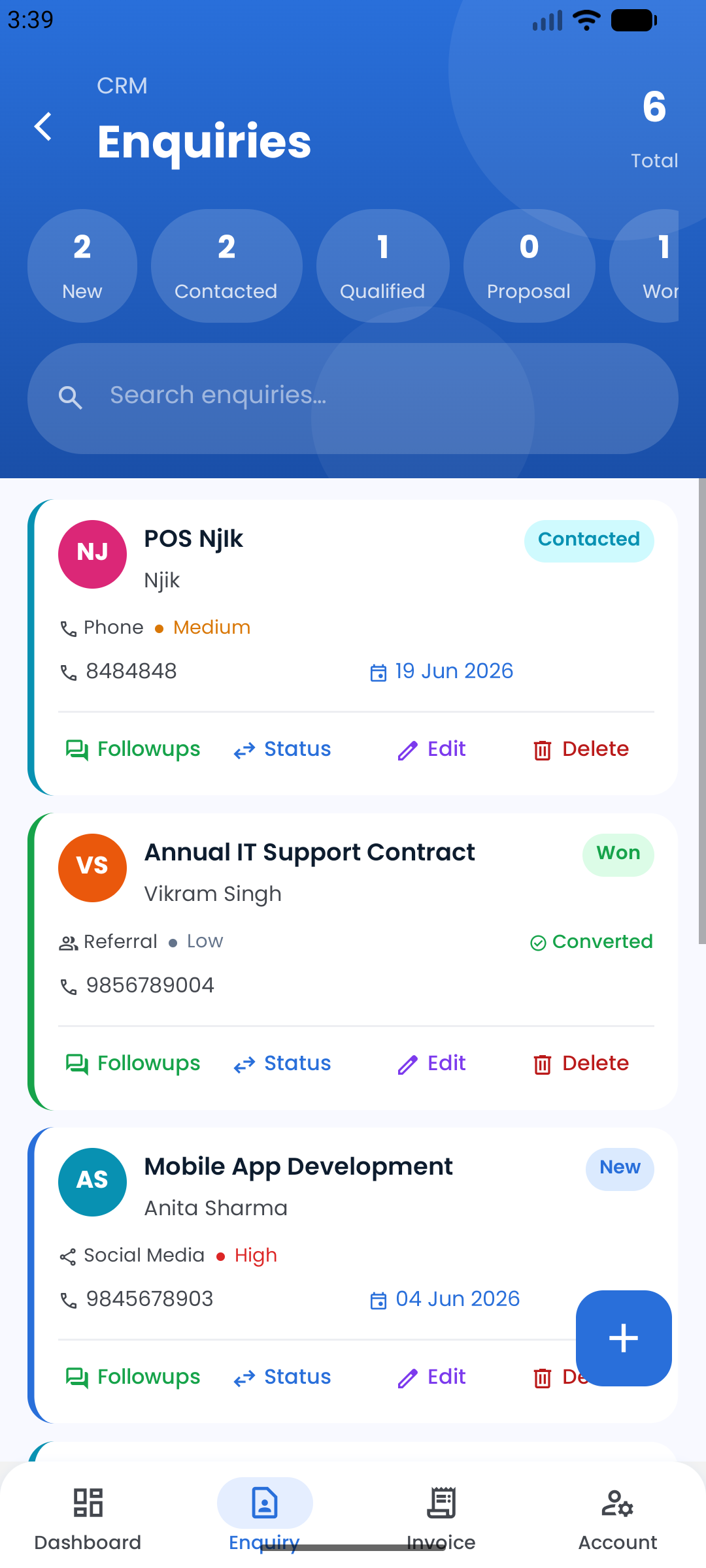
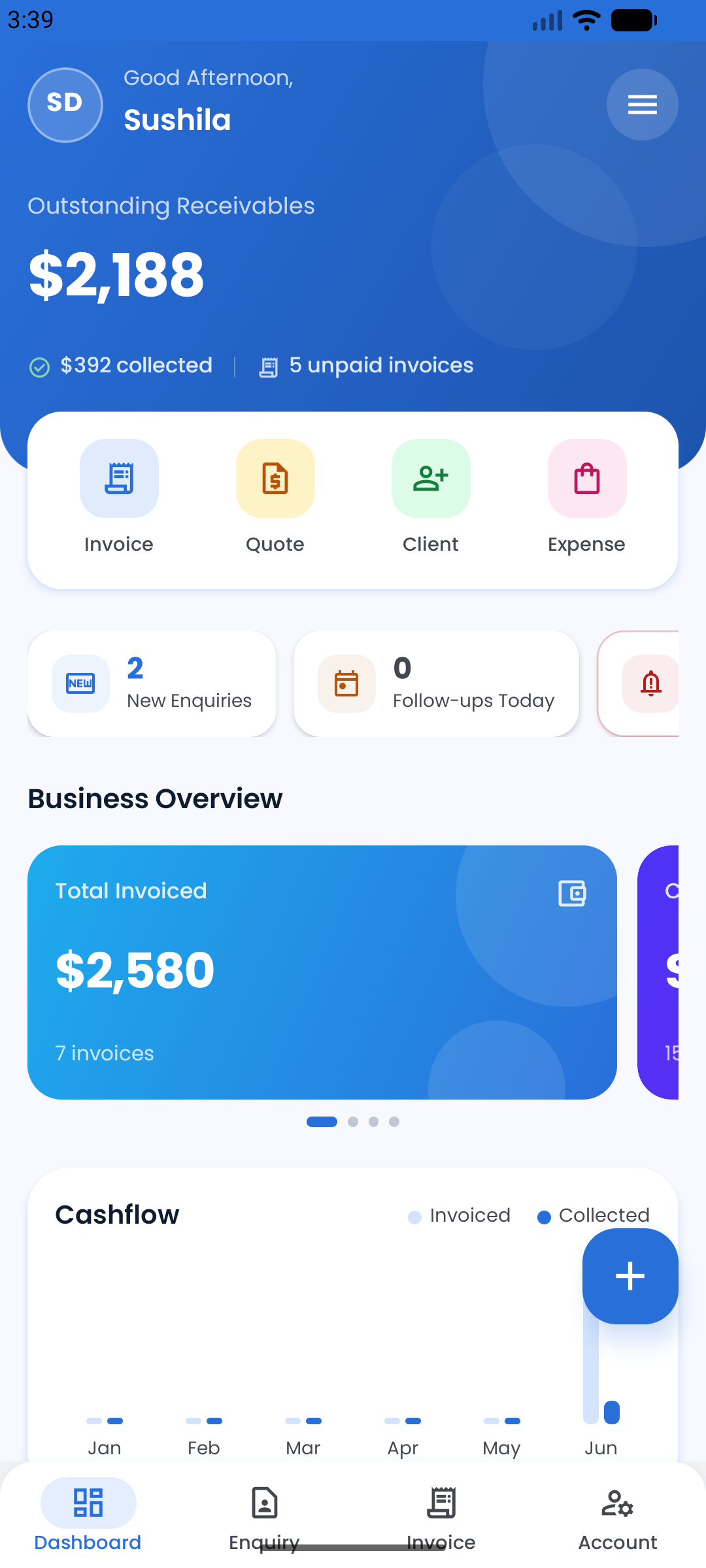
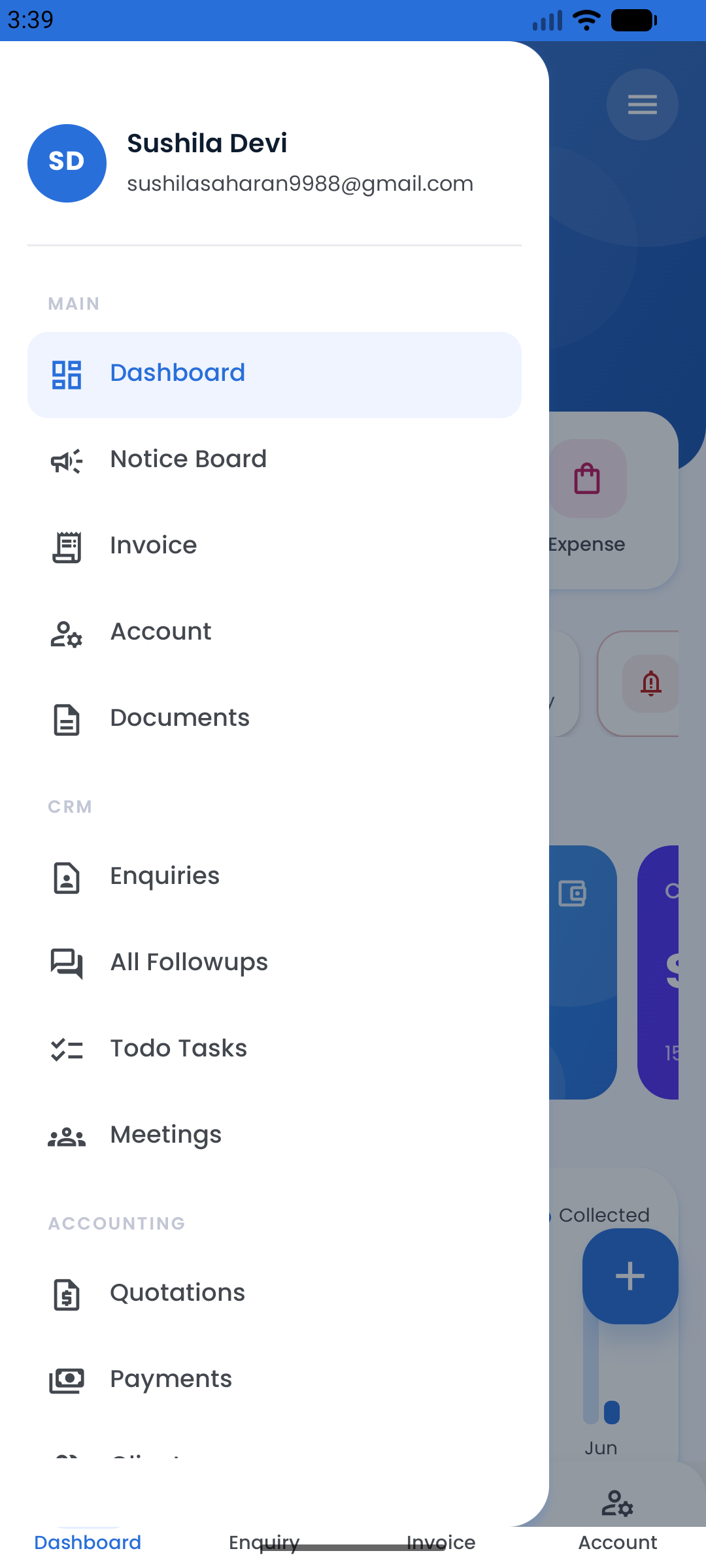
Access invoices, track CRM leads, check cashflow and manage your entire business on the go. Everything Acois can do — right from your phone.

Live Dashboard
Outstanding receivables, cashflow charts and business overview at a glance — updated in real time.
CRM & Enquiries
Track leads, follow-ups and enquiry stages from New to Won — wherever you are.
Invoices & Quotes
Create quotations, raise invoices and record payments from anywhere, on any device.
Instant Notifications
Get alerts for new enquiries, payment receipts and follow-up reminders the moment they happen.
Download on the
App Store
Get it on
Google Play
Help & Support

Fully Documented. Always Supported.

From a 27-section how-it-works guide to 75+ FAQ answers and a built-in ticket system — help is always a click away.

How It Works — 27 Sections

Full step-by-step documentation built directly into the app. Searchable, with a scrollspy table of contents — no PDF or external wiki needed.

Dashboard & Overview
Invoicing & Templates
Quotes & Sale Orders
CRM & Enquiries
Kanban Board
Todo Tasks
Meetings & Calendar
Email Campaigns
Attendance
Payroll
Reports
Roles & Permissions
AI Features
Social Media
Settings & Configuration

+ 12 more sections including Multi-Currency, Documents, WhatsApp Business API setup, and more.

FAQ — 75+ Q&A

17 categories, searchable with category filter pills, accordion-style answers — ready for your clients to self-serve.

Getting Started Invoices GST & Tax CRM & Leads Meetings Email Campaigns Attendance & Payroll Reports Roles & Permissions AI Features Settings WhatsApp Setup
Support Tickets

Built-in ticket system so your clients can raise issues directly from the app. Admin panel shows all open tickets with reply and status management.

  • Clients submit from inside app
  • Admin views all tickets
  • Reply thread per ticket
  • Status: Open / Closed
  • Open ticket count badge in admin sidebar
WhatsApp Business API Documentation

Step-by-step guide to connect your own WhatsApp Business number — Meta Business Account, App creation, Phone Number ID, WABA ID, Access Token (temp vs permanent System User), Message Templates, going live, and troubleshooting.

Social Platform OAuth Docs

Individual documentation pages for Facebook/Meta, LinkedIn, Twitter/X, YouTube, and Pinterest — covering App creation, credentials, OAuth redirect URLs, required scopes, webhook setup, App Review process, and troubleshooting.

Database Backup (Admin)

Admin panel includes a built-in database backup tool. Generate a full SQL dump of all tables, view backup history with file sizes and timestamps, and download any backup with a single click. Stored securely in storage/db/backup/.

Pricing

Plans Built for Every Business

All plans include every module. No hidden fees. Cancel anytime.

New Account? Get a 14-Day Free Trial

Every new Acois account comes with a 14-day demo period — full access to all modules, no credit card required. Explore everything before choosing a plan.

Create Free Account →
Starter
Rs.9/1 Month

Perfect for freelancers and solo businesses. Core invoicing, expenses, and basic reporting.

Included Modules
Accounting (Invoices, Quotes, SO, PO, Payments, Expenses)
CRM & Leads (Enquiries, Kanban, Meetings, Campaigns)
HR & Payroll (Staff, Attendance, Salary)
Social Media (FB, IG, LinkedIn, Twitter, YouTube, Pinterest)
Utilities (Goals & Targets, Contact Management)
Reports & Analytics (15 built-in reports)
AI Features (Chat, Email Drafter, Image Invoice, Reports)
Notifications (Email, SMS, WhatsApp alerts)
WhatsApp Business API
Email Alerts
Get Started
Professional
Rs.10/mo
for first 3 months, then Rs.15/mo

Start at $10/month for 3 months, then $15/month. Includes WhatsApp notifications and AI features.

Included Modules
Accounting (Invoices, Quotes, SO, PO, Payments, Expenses)
CRM & Leads (Enquiries, Kanban, Meetings, Campaigns)
HR & Payroll (Staff, Attendance, Salary)
Social Media (FB, IG, LinkedIn, Twitter, YouTube, Pinterest)
Utilities (Goals & Targets, Contact Management)
Reports & Analytics (15 built-in reports)
AI Features (Chat, Email Drafter, Image Invoice, Reports)
Notifications (Email, SMS, WhatsApp alerts)
WhatsApp Business API
Email Alerts
Get Started
Enterprise
Rs.249/1 Year

Everything included — CRM, HR & Payroll, AI, WhatsApp, full reports. Best value for established businesses.

Included Modules
Accounting (Invoices, Quotes, SO, PO, Payments, Expenses)
CRM & Leads (Enquiries, Kanban, Meetings, Campaigns)
HR & Payroll (Staff, Attendance, Salary)
Social Media (FB, IG, LinkedIn, Twitter, YouTube, Pinterest)
Utilities (Goals & Targets, Contact Management)
Reports & Analytics (15 built-in reports)
AI Features (Chat, Email Drafter, Image Invoice, Reports)
Notifications (Email, SMS, WhatsApp alerts)
WhatsApp Business API
Email Alerts
Get Started

Ready to Grow
Smarter?

Start your 14-day free trial — full access, no credit card needed. Join businesses already automating with Acois.

Start Free Trial →
Contact Us

Get in Touch

Have a question, need a demo, or want to discuss a custom plan? Drop us a message and we'll get back to you within 24 hours.

We'd love to hear from you

Whether you're evaluating Acois for your team, need help with a feature, or want to explore partnership — reach out and our team will respond promptly.

Live Chat
Chat with Acois AI on any page
Average response time: under 24 hours
✅ Language Changed Successfully.